In early 2026 SpaceX did something that made every installer’s job harder: they renamed the residential Starlink lineup without discontinuing anything. The kit you knew as “Gen 3” is now the Standard 4X. There is also a new budget bundle called the Standard 4, and a small router called the Router Mini that quietly became one of the most useful accessories in the ecosystem after a hardware revision in March 2026.
If you are confused by the product pages, you are not alone – we have answered the same “which one do I actually have” question a dozen times in email since the rename. This guide sorts out the naming, explains what physically differs between the two Standard bundles, walks through where the Router Mini earns its keep, and lays out the third-party alternatives for each router role. No hype, just what to buy for your situation.
| Product | Best For | Key Features | Price |
|---|---|---|---|
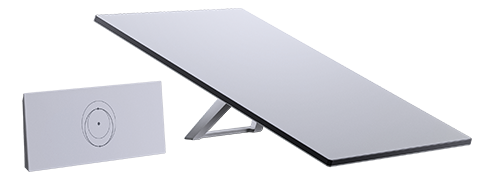 | Big Homes - Standard 4X with Router 3 |
| Check Price on Amazon |
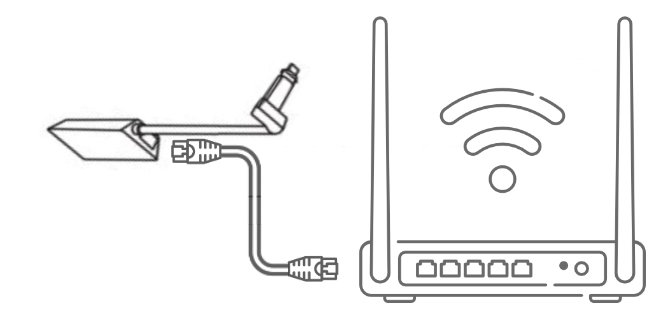 | Small Spaces - Standard 4 with Router Mini |
| Check Price on Amazon |
 | Van & Cabin - Router Mini (2026 PoE) |
| Check Price on Amazon |
The 30-Second History of the Names
Starlink’s naming has drifted for years, so let us pin it down. The rectangular residential dish most people call “Gen 3” is internally the V4 dish. When the rename happened, the dish itself did not change – same shape, same phased array, same 110-degree field of view, same mounting interface. What changed is how the kits are packaged and named:
- Starlink Standard 4X – the renamed Standard Kit: V4 dish, the Router 3 (the tri-band Wi-Fi 6 router formerly sold as the Gen 3 router), and the single-connector power supply that has shipped with the Standard Kit for years. This bundle carries the higher Residential tiers.
- Starlink Standard 4 – the budget bundle: same V4 dish, but with the smaller Router Mini and a new power supply with dual PoE-style outputs that powers the dish and the router separately. It ships with the entry Residential 100Mbps plan.
- Router 3 – what everyone will keep calling the Gen 3 router for the next three years.
- Performance line – restructured earlier, in mid-2025: the old Flat High Performance became Performance (Gen 2), and the enterprise flagship released that year is Performance (Gen 3).
The “4” in both Standard names refers to the V4 dish generation, not a fourth dish revision. SpaceX has not released a new residential dish – this was a rename and a bundle split. Anyone telling you the Standard 4 has “a new antenna” has not opened a box.
The Dish Is Identical – and That Is the Best News Here
For accessory buyers, this is the part that matters most. The V4 dish in both bundles measures roughly 23.4 by 15 inches, weighs about 4.2 kg with its attached 15-meter cable, carries an IP67-type weather rating, and operates from -30°C to +50°C. The kickstand folds from the back, the pipe-adapter socket is unchanged, and the cable exits the same way.
Translation: every mount, pole adapter, roof clamp, and cable extension sold as “Gen 3 compatible” fits both the Standard 4 and the Standard 4X without modification. Our full compatibility matrix holds for both names. If a listing claims its mount is “Standard 4X only,” that is marketing, not engineering.
Where the Two Bundles Actually Differ: The Router
The Router 3 is a tri-band Wi-Fi 6 unit built for whole-property coverage – Starlink markets it at up to around 297 square meters, and in a normal single-family home it genuinely covers most of a floor plan on its own. It has two Ethernet ports on the back, which is how Gen 3 owners run bypass mode without buying anything extra.
The Router Mini is a different animal. It launched in May 2025 as a small dual-band Wi-Fi 6 box with a built-in Ethernet WAN port and a LAN port, positioned as an accessory rather than a primary router. The first version was cheap and a little limited. Then in March 2026, Starlink revised it: the new version accepts PoE power from the Standard 4’s dual-port supply, widens the DC input range to roughly 9-24V, and – notably – went from $40 to $100.
How to tell the versions apart at a glance: the original Router Mini’s ports are labeled with little pictograms (a dish and a computer icon); the revised PoE version’s ports are simply labeled 1 and 2. If you are buying used or from a marketplace seller, ask for a photo of the back.
Which Bundle Makes Sense for Which Home
Get the Standard 4X if your house is large, has interior masonry, or you plan to run multiple mesh nodes. The Router 3’s radio budget and its two Ethernet ports make it the flexible centerpiece, and bypass mode is a two-cable job if you ever want third-party gear in charge.
Get the Standard 4 if you live in an apartment, a small house, or a cabin where one modest router covers the space, and the lower entry plan matches your usage. The dish is identical, so you lose nothing there, and you can add a Router 3 later – both routers mesh with each other, so the ecosystem grows without awkward incompatibilities.
Skip both and look at Enterprise packaging if you already own a serious router and just want the dish as an uplink: the Enterprise variant of the same dish ships without a consumer router at all, with a separate outdoor-rated power supply and an Ethernet handoff, which is exactly what an existing firewall or UniFi gateway wants.
Three Real Jobs for the Router Mini (PoE Version)
The Router Mini became interesting with the 2026 revision. Three use cases cover most owners:
1. Extending the Mini dish’s Wi-Fi indoors. The Starlink Mini dish has a router built in, but its radio sits outside where the dish sits – on a dash, a roof rack, a windowsill. Put a Router Mini inside the van or cabin, link it to the dish (wirelessly via mesh, or better, hardwired if you run a USB-C Ethernet adapter on the Mini), and your devices stop fighting for a signal through a metal wall. This is now the standard van-build pattern, and our Mini setup guide covers the mounting side of it.
2. Bridging an outdoor Gen 2 or Router 3 bay into living space. Plenty of RV owners bolt the main router into an exterior bay to shorten the dish cable run, then suffer weak Wi-Fi inside. A Router Mini inside the coach, meshed to the outdoor router, fixes coverage without touching cables. It also meshes with Gen 2 routers, which is a rare bit of backward friendliness in this ecosystem.
3. DC-powered installs without an inverter. The 9-24V input on the revised Router Mini means you can run it straight from a 12V or 24V house battery bank with a fuse and a cable – no inverter, no conversion losses. For off-grid builds this is the cleanest router option in the lineup, and it pairs naturally with the wiring practices in our 12V and solar guide.
Third-Party Alternatives for Each Role
Starlink’s routers are good, but they are not the only path, and sometimes they are not even the best one:
- Replacing the Router Mini: any compact travel router with a WAN port does the same indoor-extension job, and several cost less than $100 – though the PoE input and native mesh pairing with Router 3 are things generics do not replicate. If you want a travel router that also runs off 12V USB, the generic options are genuinely competitive.
- Replacing the Router 3: power users should not replace it – bypass it. Both Router 3 Ethernet ports put it into bypass mode, handing your firewall, UniFi, or Omada gateway a clean WAN. Our router deep dive covers which third-party mesh systems behave well behind a Starlink uplink, and the bypass wiring guide shows the exact Gen 2 and Gen 3 cabling.
- Replacing the Standard 4’s Router Mini with a Router 3: possible and straightforward – they mesh together, and any router you buy from the Starlink shop pairs with the dish you have. This is the upgrade path if you start small and grow.
Quick Answers
Is the Standard 4 dish weaker or slower? No. Same V4 hardware as the 4X. Plan tier and router are the differences.
Can the Router Mini power the dish? No. It is the other way around – the Standard 4’s dual-port supply feeds both. The Router Mini cannot substitute for the Router 3 or any older dish’s power supply.
Do Standard 4 and 4X accessories differ? No. The dish and its mounting interface are identical; the accessory ecosystem is one ecosystem.
Which Router Mini version did I get? Check the port labels: pictograms mean the 2025 original, “1 and 2” means the 2026 PoE revision with the wide DC input.
Bottom line: the rename is noise, the dish is one dish, and the real decision is which router sits under it. Buy the bundle that matches your floor plan, and remember that in this ecosystem every router can be added later – only the dish is a long-term commitment.